Group the windows
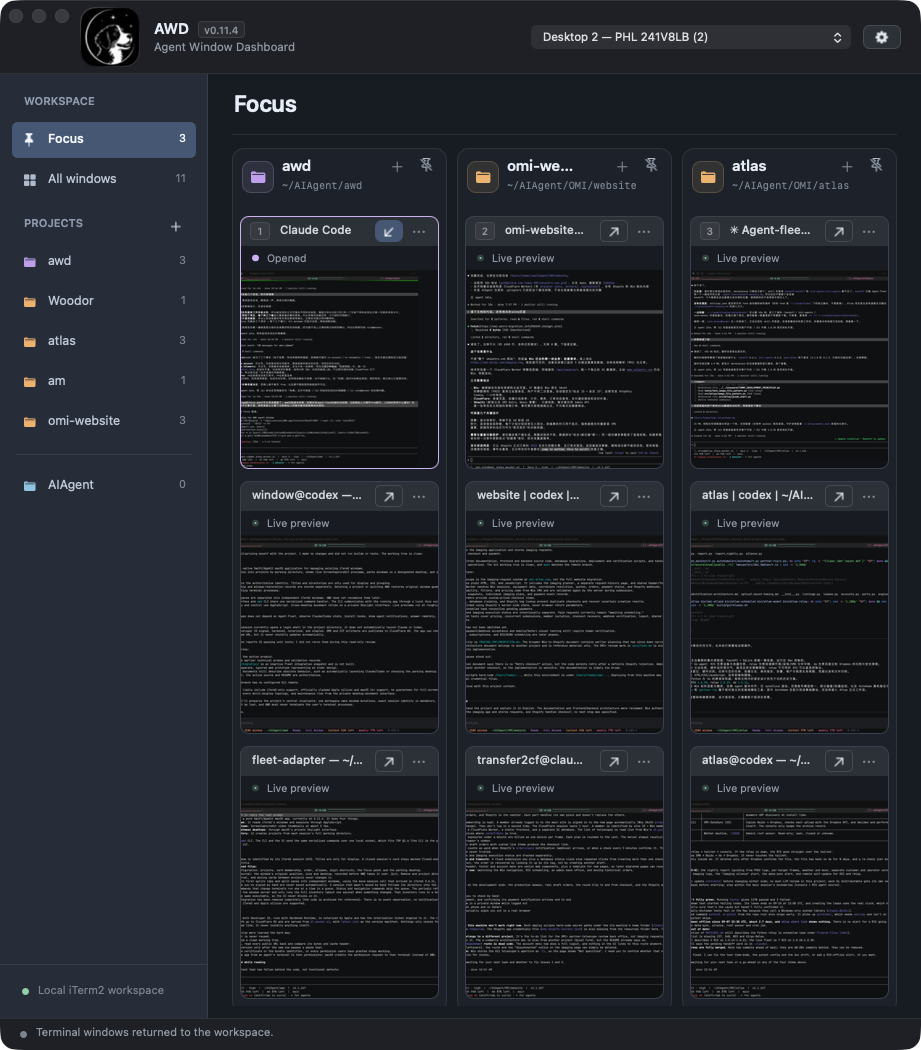
AWD finds live iTerm2 sessions and separates tabs and splits into windows grouped by working directory.
Free native macOS app
Group live terminal windows by project, see their activity at a glance, and bring the right window back without interrupting the work inside.
Apple silicon · macOS 14+ · iTerm2 3.6.11+
By downloading AWD, you agree to the Terms and End User License Agreement.
The working loop
AWD finds live iTerm2 sessions and separates tabs and splits into windows grouped by working directory.
Live previews show activity across projects without asking you to open every terminal.
Open the window you need, then return it to the desktop where AWD keeps the rest of your workspace.
A workspace, not a transcript
AWD reads and moves iTerm2 windows. It does not replace their processes, output, or session state. Open a window to work in the original terminal, then return it when you are done.
Pin up to three projects with three windows each, with stable shortcut numbers.
Drag projects and windows into the order that matches your work. Add aliases when folder names are not enough.
AWD remembers window membership and restores managed windows when you remove them or quit.
Clear boundaries
AWD shows visual activity. It does not interpret agent state, answer approval requests, send terminal input, or move messages between sessions.
AWD connects only when you press Check for updates, to read a public release manifest.
Read the privacy policy →Before you install
AWD supports Apple silicon Macs running macOS 14 or later with iTerm2 3.6.11 or later. Keep a separate macOS desktop available for parked windows.
Open the disk image and move AWD to Applications.
Allow Screen Recording and control of iTerm2. Accessibility is optional for window shortcuts.
Choose a parking desktop, then let AWD organize your existing sessions.
Known limits
AWD is not designed for full-screen terminal windows, Stage Manager, tmux panes, or every possible multi-display and multi-space arrangement. Its live previews are for spotting activity, not for reading terminal text.
Available now
Free for Apple silicon Macs. Requires macOS 14+ and iTerm2 3.6.11+.
AWD 0.11.5 and later are provided under the End User License Agreement.